Meta Ads for B2B: What Actually Works in 2026
Meta removed most of the controls B2B advertisers relied on. What remains is a three-layer system. Here is how it works, who Meta actually works for, and what to do in your account.

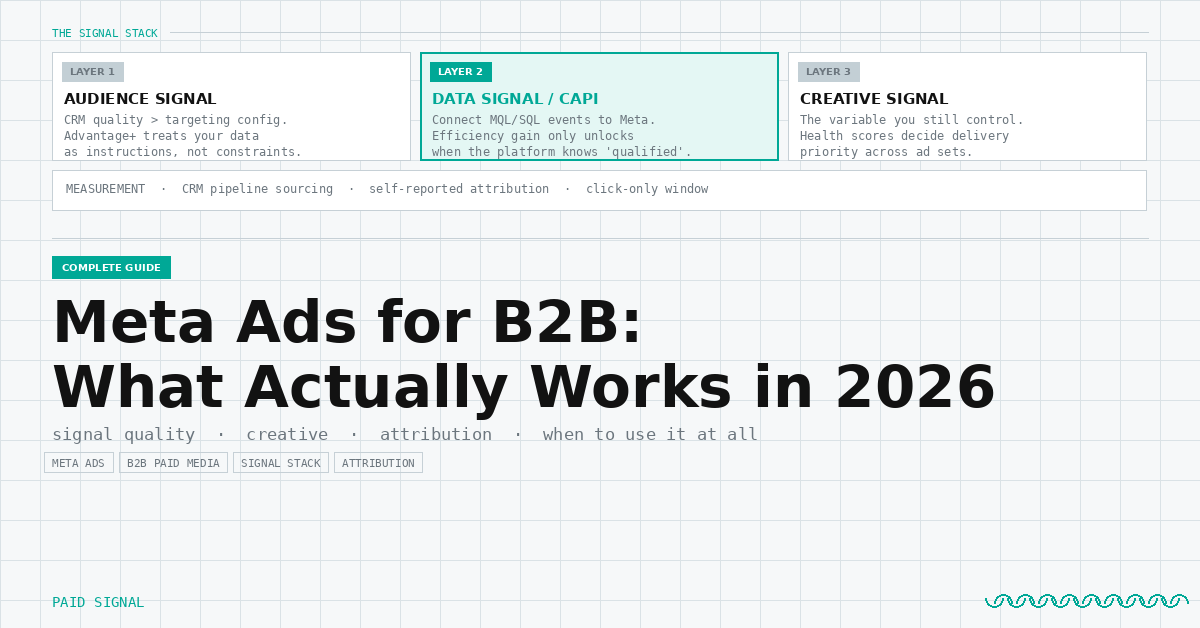
Meta has removed most of the controls B2B advertisers relied on. Granular interest targeting, manual audience layering, and precise demographic controls have been systematically replaced by platform-driven delivery. What remains is a three-layer system: the signal you feed Meta, the creative you give it to work with, and the measurement framework you use to evaluate whether it is working at all.
This guide covers each layer. It also covers the question that comes before any of it: is Meta the right channel for your B2B account in the first place. That answer depends on your TAM, your ICP, and what your sales team can actually ingest. Getting that wrong is expensive in both directions.
The framework across this guide is the Signal Stack. Audience signal, data signal, creative signal. Measurement sits outside it and tells you whether the stack is working. Each layer has a full post behind it. This guide gives you the operating logic across all of them.
Layer 1: Audience. You No Longer Control Who Sees Your Ads
Meta's audience targeting model changed after iOS 14 and has continued moving in one direction: away from advertiser control, toward platform-driven delivery.
The old model was straightforward. You built the audience. Job title interests, industry behaviors, company size, demographic filters, exclusion layers. Meta delivered to the parameters you set. You controlled the box.
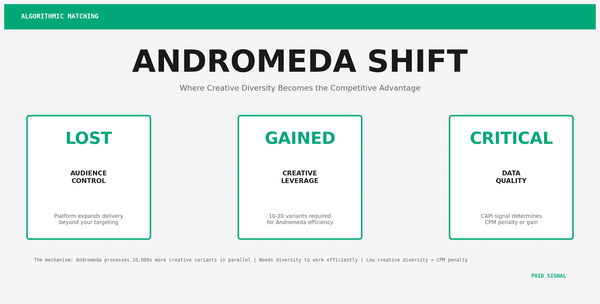
That model is largely gone. Advantage+ Audience is the current expression of what replaced it. You provide suggested audiences: a CRM upload, a demographic range, relevant interest categories. The platform treats these as recommendations, not hard constraints. It can and will expand beyond them when it determines broader delivery will improve results.
This is not a malfunction. It is Meta's stated product direction. The question for B2B advertisers is not whether you can fight it. You cannot. The question is whether Meta has enough signal about your buyers to make platform-driven delivery useful rather than wasteful.
If your CRM contains 5,000 or more contacts from your ICP, Meta has enough data to find similar buyers. If you are selling to a narrow set of enterprise titles at companies above 1,000 employees, Meta's signal on that audience is thin and delivery will drift.
The shift changes what matters. First-party data quality is now more important than targeting configuration. A strong CRM upload, a clean customer list, a high-match-rate pixel audience: these are the inputs that determine delivery quality. Targeting settings are suggestions. Your data is the actual instruction.
For the full breakdown of how Advantage+ Audience works and the specific scenarios where Meta B2B targeting holds up, see Meta Ads Audience Targeting for B2B Has Changed. Here Is Who It Actually Works For.
Layer 2: Data Signal. CAPI Is the Gate
Platform-driven delivery is only as good as the signal you give the platform to work with. That signal comes from your Conversions API setup.
Without CAPI, Meta's algorithm optimizes on browser-based pixel events: page views, form fills, clicks. These events are increasingly unreliable due to iOS privacy settings, ad blockers, and cookie restrictions. The platform sees a degraded version of your buyer behavior and optimizes against it. The result is more volume, lower reported cost per lead, and a pipeline quality problem your SDR team discovers after the fact.
With CAPI connected and downstream conversion events flowing back to Meta, the platform learns what a qualified opportunity actually looks like for your business. You send it MQL data, or better, SQL data. The algorithm adjusts delivery toward the buyer behaviors that correlate with real pipeline. Cost per qualified opportunity drops. The efficiency gain that Meta advertises for Advantage+ Leads is real, but it only materializes when CAPI is wired correctly.
One tested scenario showed a 20 percent lower CPL with Advantage+ versus manual targeting. When cost per MQL was pulled from CRM data, Advantage+ without CAPI ran nearly 2x higher. Once CAPI was connected and the algorithm had qualified conversion data to learn from, CPL held low and MQL conversion improved. That is the CAPI gate.
CAPI is not optional at meaningful spend. It is the foundation everything else builds on.
For the full setup and three-day checklist, see Meta Advantage+ Leads for B2B: Why CAPI Is the Gate to the Efficiency Gain.
Layer 3: Creative. The Variable You Still Control
When audience delivery and bidding are automated, creative is what remains in your hands. It is also what the platform uses to differentiate performance across ad sets running to similar audiences.
Meta's Creative Health Metrics dashboard gives you the platform's assessment of your creative across four dimensions: creative quality, audience resonance, conversion likelihood, and landing page experience. These are not engagement metrics. They are optimization signals. The platform uses them to determine delivery priority across competing ads.
The practical implication: two ads running to the same audience with the same bid can have dramatically different delivery volumes based on creative scores. Low creative health means the platform restricts delivery. High creative health means it leans in.
For B2B advertisers, the creative tendency that hurts most is corporate-safe design. Busy layouts, small text, branding-first imagery, multi-message copy. These perform below average on creative health metrics consistently. What performs above average: single-focus visuals, direct headline with one claim, short body copy that treats the viewer as already informed.
The test worth running: pull your current ad set, check creative health for each active ad, pause the bottom 25 percent by score, and reallocate budget to the top performers for two weeks. Measure cost per qualified form fill, not CPL. That is the creative health signal that matters for B2B.
For the full breakdown of what each metric measures and how to act on it, see Meta Creative Health Metrics: What B2B Advertisers Need to Know.
Measurement: Assume Attribution Is Broken, Track It Anyway
Meta's default attribution window is a 7-day click and 1-day view. For B2B advertisers with 60 to 180-day sales cycles, that window captures a fraction of Meta's actual contribution to pipeline. Meta's reported conversions will always be lower than its real impact, and its view-through attribution will always be higher than is defensible. Both numbers are wrong in different directions.
The measurement stack that works for B2B has three layers.
In-platform data. CAPI-connected pixel events, click-only attribution (turn off view-through for B2B), and campaign-level conversion counts. Treat this as a conservative lower bound. Useful for relative performance comparison across ad sets, not useful as your primary budget justification.
CRM pipeline sourcing. UTM parameters on every Meta campaign that pass through to your CRM on form submission. At month end, pull qualified pipeline by first-touch source. Divide total Meta spend by qualified opportunities from Meta-sourced contacts. That is your cost per qualified pipeline opportunity, the only CPL metric worth reporting to stakeholders.
Self-reported attribution. A "how did you first hear about us?" field on every form. Free text or a short dropdown. This captures dark funnel influence that neither Meta nor your CRM can track. Buyers who saw your ad weeks before converting through organic search will show up as organic in your UTM data. Self-reported responses surface the channels working invisibly. Across 50 or more responses it becomes directionally reliable.
These three layers do not add up neatly. That is fine. The goal is defensible direction, not false precision.
For the full measurement framework and what to report to stakeholders skeptical of Meta in a B2B plan, see Meta's Attribution Dashboard Shows What Meta Wants You to See. Here Is How to Measure B2B Pipeline Instead.
Placements: The One Threads Decision
Threads ads now run through Meta's standard Ads Manager as an additional placement. For B2B advertisers, the question is simple: does your audience use Threads at a volume that justifies testing it as a distinct placement, or is it noise in your delivery mix?
The honest answer for most B2B accounts is that Threads is not a primary placement yet. It is a low-cost incremental reach layer. The risk of including it without monitoring is that budget migrates toward cheap Threads inventory that does not convert to pipeline. The fix is straightforward: break Threads out as a separate ad set, run it for four weeks at capped spend, and compare cost per qualified form fill against your feed placements.
If it holds up, keep it. If it does not, exclude it from your main campaigns. That is the one decision Threads requires.
For the full placement analysis, see Threads Ads in Meta B2B Campaigns: What the Placement Data Shows.
The Signal Stack Fit Test: Is Meta Right for Your B2B Account?
Most B2B teams default to Google and LinkedIn and ignore Meta entirely. That is a defensible starting point. It is not always the right answer.
Meta's CPM runs 5 to 10 times lower than LinkedIn in most B2B categories. That efficiency gap is real and it compounds. A $10,000 monthly Meta budget generates substantially more impressions, more creative tests, and more pipeline data than the same budget on LinkedIn. The question is whether those impressions are reaching buyers who matter.
Meta makes the most sense when your TAM is wide. If your ICP spans multiple industries, company sizes, and job function categories, Meta's broad delivery has enough signal to find buyers within a large pool. The platform does not know that a VP of Marketing at a 200-person SaaS company is more valuable to you than a Marketing Manager at a 50-person agency. But if both are in your ICP, Meta can find both at scale and the signal volume makes its optimization reliable.
Meta works well as a retargeting and pipeline acceleration layer even when LinkedIn is your primary prospecting channel. Buyers who engaged with your LinkedIn content, visited your site, or opened your emails are warm. Retargeting them on Meta with a direct offer costs a fraction of what it costs to reach cold audiences on LinkedIn. This is the configuration that captures the most value from Meta without relying on its prospecting capabilities: let LinkedIn do the ICP-specific targeting, let Meta do the low-cost follow-through.
Meta is the wrong primary channel when your ICP is narrow and enterprise. If you are selling to a short list of specific titles at companies above 1,000 employees in a defined industry, LinkedIn's demographic targeting holds up where Meta's does not. The CPM premium on LinkedIn is the cost of that precision. For tight ICPs, paying it is correct.
Sales team capacity is a factor that most B2B teams do not think about before scaling Meta. Meta at meaningful spend generates volume. If your SDR team cannot ingest that volume at quality, the efficiency advantage disappears in pipeline confusion. Before scaling Meta prospecting, establish what your team can work: how many new qualified opportunities per week can they handle without letting warm pipeline go cold? Size your Meta budget to that capacity. You can always scale once the system holds up.
The Signal Stack Fit Test in practical terms:
- TAM above 50,000 companies or ICP covers multiple industries: Meta prospecting is worth testing.
- TAM below 10,000 companies or very specific titles at enterprise accounts: LinkedIn first, Meta for retargeting only.
- Sales capacity below 20 qualified opportunities per week: cap Meta spend until capacity expands.
- No CAPI setup: do not run Meta at meaningful spend. Fix the foundation first.
- Strong CRM data and clean customer list: Meta prospecting has the signal it needs to work.
What to Do Next
Three actions in order.
First: audit your CAPI coverage. Go to Meta Events Manager and check match rate for your lead form conversion event. If match rate is below 80 percent, your signal quality is degraded. Fix CAPI before changing anything else in your campaigns.
Second: pull creative health scores. In Ads Manager, add the Creative Reporting columns to your active campaigns. Sort by creative quality score. Pause the bottom 25 percent by score. Reallocate that budget to your top performers for two weeks and measure cost per qualified form fill.
Third: build the measurement stack. Confirm UTM parameters are passing through to your CRM on every Meta-driven form fill. Add a self-reported attribution field if you do not have one. At the end of this month, pull qualified pipeline by source from your CRM and calculate cost per qualified opportunity from Meta spend. That is the number that tells you whether Meta belongs in your plan.
Start with CAPI. Everything else in the Signal Stack depends on it.
What's changing in B2B paid media. What it means for your pipeline.